Essentials
The Intelligence Hub is accessible from the Gurobi portal and directly at intelligence.gurobi.com.
Note
Gurobot is generally available (GA since June 2025).
Modeler is generally available (GA since October 2026).
Explainer and the MCP server are experimental—available for you to explore, and they may change significantly before becoming generally available.
Help us improve
Your feedback helps us improve Gurobot, Modeler, and Explainer, and gives you a better experience in return. Please share it using the thumbs up / thumbs down buttons in the chat.
Terms of Service
When you access the Intelligence Hub for the first time, you are presented with the Terms of Service and Privacy Policy. You must review and accept these terms before you can use the agents. Click ACCEPT to proceed, or DECLINE to opt out. You will not be able to use the Intelligence Hub agents until the terms are accepted.
Key points covered by the Terms of Service:
Scope: The service is designed solely for discussions and inquiries related to mathematical optimization and the usage of Gurobi products.
Usage limits: Daily usage limits apply to your interactions. Access may be temporarily suspended if you exceed those limits.
Data storage: All interactions with the service are stored, including inputs, outputs, and any files generated during a session. You can delete individual conversations or all conversations from your account at any time (see Settings).
Data privacy: Your interactions are not used to train large language models (LLMs). They may be used to validate, upgrade, and improve the service.
Security: Inputs you submit to the service are protected by:
Encryption in transit: All inputs sent between your device and the service are encrypted with HTTPS.
Encryption at rest: Inputs are encrypted using application-layer encryption, with a unique key per file.
Isolated processing: Inputs are processed in a dedicated environment with no shared state or filesystem with any other session or user.
Limited exposure: Portions of your inputs are transmitted to a large language model running within Gurobi’s secure cloud infrastructure solely to fulfill your request.
Model Input Files: Optimization model files you submit are used only to deliver your request. They are not added to Gurobi’s model library and are not used for solver benchmarking. If you escalate an interaction to a Gurobi support ticket, the associated model files become governed by Section 7.2 of the Gurobi EULA.
Deletion: Your inputs are permanently deleted when you delete the chat session, delete all chats for an agent, delete all chats, delete your account, or send a written deletion request to
operations@gurobi.com, subject to applicable legal retention requirements.Personal data: Do not include data that identifies or could reasonably be linked to a natural person (names, addresses, social security numbers, payment card information, etc.) in your inputs.
Generative AI disclaimer: The service uses generative AI and may produce inaccuracies. You should independently verify any output before relying on it.
Using the Web Application
The sections below cover the parts of the Intelligence Hub UI you interact with directly: the home page, the sidebar navigation, the chat insights panel, and the daily usage indicator.
Home Page
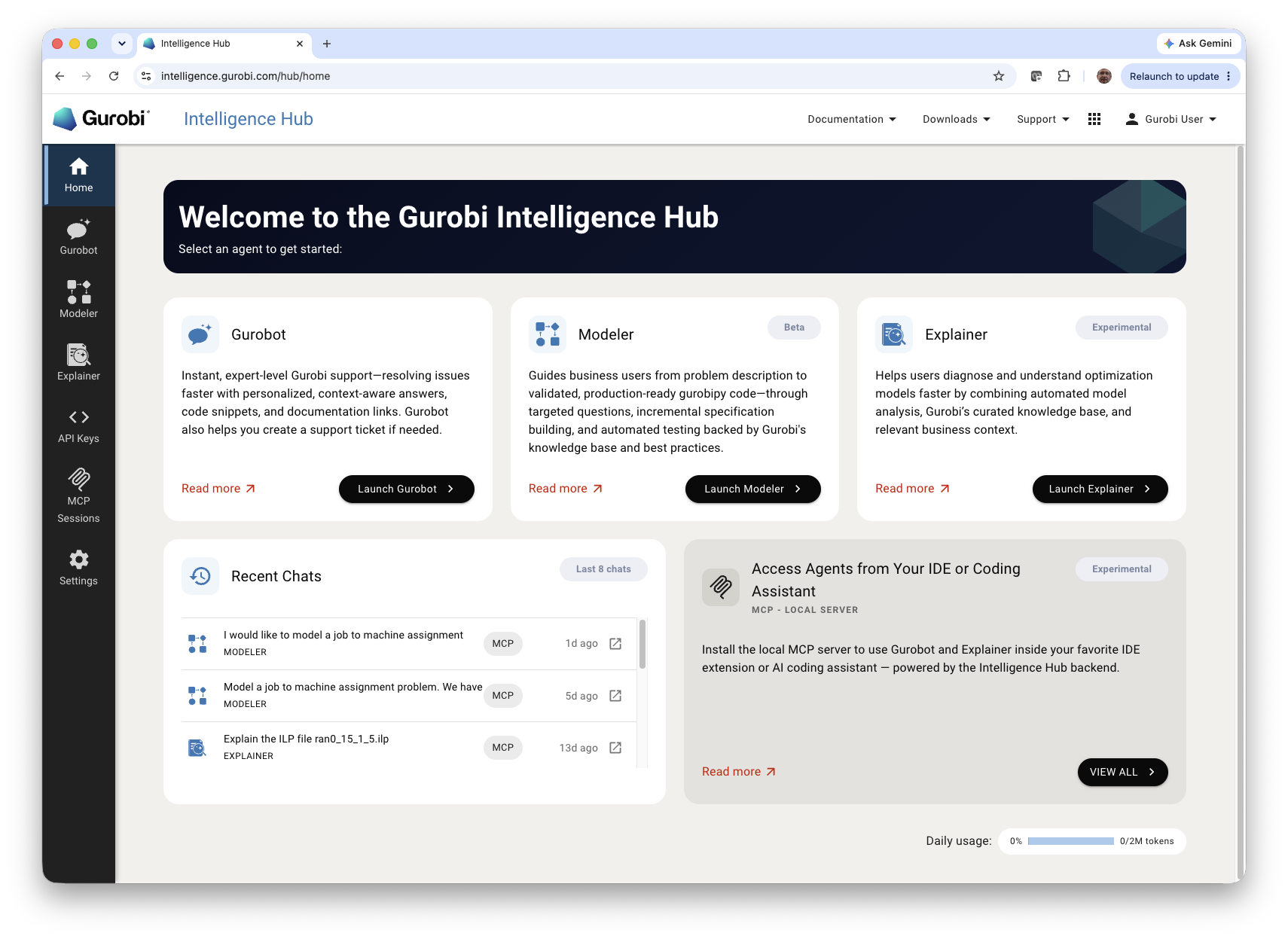
After accepting the terms, the home page displays the available agents with a brief description of each.
Insights
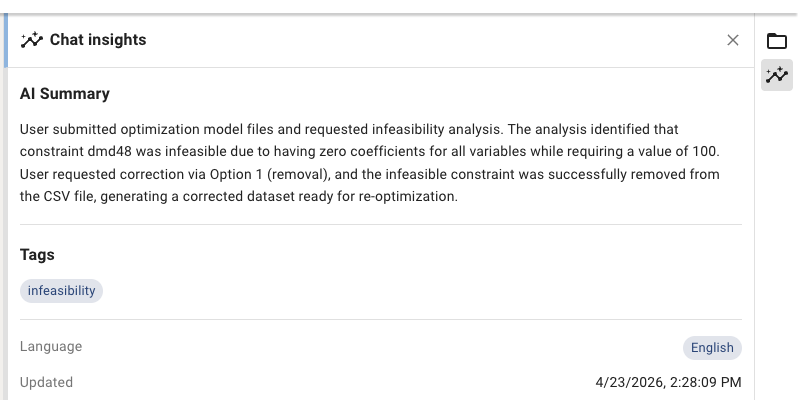
Each conversation has a Chat insights panel that you can open from the icon on the right sidebar. It provides an at-a-glance view of the conversation, including:
AI Summary: A concise, automatically generated summary of what was discussed, what was uploaded, and what was resolved.
Tags: Topical labels (such as
infeasibility) that classify the conversation.Language: The language detected for the conversation.
Updated: The timestamp of the most recent activity.
Note
Insights are generated in the background, so it may take some time for the data to appear or refresh after new activity.
Daily Usage
A daily usage indicator is displayed at the bottom of the home page. It shows the percentage of the daily token limit consumed across all agents, along with the exact token count and total allocation. Usage resets daily. If you exceed your daily limit, access to the agents may be temporarily suspended until the next reset.
Feedback
Every agent response carries a pair of feedback controls—a thumbs up and a thumbs down—that let you tell us whether the answer was helpful.

Clicking either one opens a short form where you can add a comment explaining what was good or what fell short. The comment is optional, but the more specific you are—what you expected, what was missing or wrong, what worked well—the more useful your feedback becomes.
Gurobi’s mathematical optimization experts review this feedback and use it to improve the knowledge base and the agents’ instructions and processes. Please use it liberally—both positive and negative. Your interactions are never used to train large language models, and the optimization model files you submit are not added to Gurobi’s model library or used for solver benchmarking (see the Terms of Service).
Tools
The agents share a common set of tools that shape their behavior across every conversation: a curated knowledge base for retrieving authoritative documentation, a coding guide that captures Gurobi’s API best practices, a per-conversation workspace for uploaded and generated files, and a sandboxed code execution environment for running Python.
Knowledge Base
All three agents are backed by a Gurobi-curated knowledge base—a vector database that indexes content authored or vetted by Gurobi experts. Whenever you ask a question, the agent retrieves the most relevant passages and uses them to ground its response, with citations back to the original sources.
The knowledge base is updated daily and currently includes:
Expert articles written and reviewed by Gurobi optimization specialists.
Reference manuals for the Gurobi Optimizer and related products.
Code from official Gurobi GitHub repositories, including the example models and integration libraries.
Modeling and performance best practices drawn from Gurobi’s training material and customer-facing guidance.
Public content from gurobi.com, such as blog posts and product pages.
This curated retrieval layer is a key differentiator over a stand-alone LLM:
Grounded answers. Responses are anchored in documents Gurobi has reviewed, so you get guidance that reflects how the products actually behave—not generic advice scraped from the open web.
Reduced hallucinations. When the agent has authoritative passages to cite, it is far less likely to invent APIs, parameters, or behaviors that do not exist.
Always current. Daily indexing means new articles, parameter changes, and recent releases are picked up quickly. The knowledge base covers the gap between an LLM’s training cutoff and what shipped this week.
Traceable citations. Every response can link back to the underlying document, so you can verify the source and read further if needed.
Consistency across agents. Gurobot, Explainer, and Modeler all draw from the same vetted corpus, so their recommendations stay aligned with Gurobi’s official guidance.
Coding Guide
Whenever an agent writes or reviews gurobipy code, it consults a
dedicated coding guide maintained by Gurobi. The guide compiles, in a
single reference, how to use the Gurobi API correctly—covering the
common pitfalls our experts see in customer code as well as the patterns
they recommend for clear, performant, and maintainable models.
The guide is built from the ground up by Gurobi optimization specialists and is continuously refined based on:
Recurring issues observed in support tickets and customer code reviews.
Best practices for model building, parameter tuning, and performance.
API usage patterns that take full advantage of
gurobipyandgurobipy-pandas.
Note
The coding guide is a work in progress. It currently focuses on
gurobipy, and we may extend it to other Gurobi APIs and
languages, as well as additional programming styles, in future
releases.
Workspace
Each agent conversation has its own workspace—a storage area for files that are uploaded by you or generated by the agent during the session. Files in the workspace persist across messages within the same conversation and remain accessible when you revisit the chat later.
All three agents—Gurobot, Explainer, and Modeler—use the workspace. Files
you upload (such as ILP files, source code, or documentation) are stored in
the workspace so the agent can reference them throughout the conversation.
Files generated by the agent are also saved there: infeasibility reports from
Explainer, code files and execution logs from Gurobot, and specifications,
gurobipy implementations, pytest test suites, and mathematical
formulations from Modeler.
Generated files appear as Attachments in the chat message. For each file you can:
Copy the content to your clipboard.
Download the file for offline use.
Clicking on an attachment opens it in a side panel next to the conversation, so you can review the file content while continuing to chat.
See the Gurobot, Explainer, and Modeler pages for details on the types of files each agent generates.
Code Execution
Agents can run code on your behalf—for example, to verify a gurobipy
script generated by Gurobot or to run the pytest suite produced by
Modeler. Code is executed in an isolated, dedicated environment that is
created fresh for each chat.
Available runtime and packages. Python 3 is available with the following pre-installed packages:
gurobipy— Gurobi Python API for building and solving optimization models.gurobipy-pandas— Gurobi and pandas integration helpers.numpy— numerical computing.pandas— data manipulation and analysis.scipy— scientific computing (optimization, linear algebra, statistics).pytest— test framework; used to run.pytest files from the workspace.
Limitations.
Additional packages cannot be installed.
No internet access.
Compute Server and Instant Cloud cannot be used.
The bundled license is limited to 2000 variables and 2000 constraints.
CPU and memory resources are very limited, so unit tests must be small in size.
Execution time is limited to 60 seconds per command.
How the Intelligence Hub Compares to a General-Purpose AI Assistant
General-purpose assistants such as ChatGPT and Claude are highly capable, and they continue to add features very rapidly. The Gurobi Intelligence Hub is not a replacement for those tools—it is a specialized environment purpose-built for mathematical optimization with Gurobi, with concrete advantages where it matters most:
Expert knowledge, curated by Gurobi. Every agent draws on a vector knowledge base that indexes expert articles, reference manuals, official Gurobi GitHub repositories, modeling and performance best practices, and content from gurobi.com—written, reviewed, and maintained by Gurobi optimization specialists. Responses cite the underlying sources, so you always know where the answer came from.
Always up to date, beyond the LLM cutoff. The knowledge base is re-indexed daily, so new articles, parameter changes, and recent product releases are typically reflected within a day. This closes the gap between an LLM’s training cutoff and what shipped this week—and ensures the answers you get reflect the latest Gurobi version.
Expert-driven continuous improvement. The feedback you leave—the thumbs up / thumbs down ratings and comments on responses—is reviewed by Gurobi’s mathematical optimization experts. They act on it to keep the agents sharp: adding new articles to the knowledge base, correcting and clarifying existing ones, and updating the agents’ instructions and processes. Your interactions are never used to train large language models, and the optimization model files you submit are not added to Gurobi’s model library or used for solver benchmarking.
Built-in optimization analysis workflows. Explainer invokes Gurobi’s own algorithms—IIS for infeasibility diagnosis, FeasRelax for feasibility restoration, and basis-derived sensitivity analysis—directly on your model, and runs them through dedicated, specialized scripts that encode Gurobi’s diagnostic best practices. You get results computed by the solver itself, structured the way a Gurobi expert would present them.
From business problem to working model, end to end. Modeler co-develops a structured specification with you, generates a complete
gurobipyimplementation and apytestsuite, executes the tests, iterates on the implementation, and halts to surface genuine inconsistencies between the specification, the code, and the tests—a full modeling loop in a single conversation.A Gurobi runtime ready out of the box. Each conversation comes with a sandboxed Python environment that already has
gurobipy,gurobipy-pandas,numpy,pandas,scipy, andpytestinstalled, plus a limited Gurobi license available.Connected to your Gurobi license and support. Gurobot looks up your current Gurobi license and answers questions specific to Gurobi Optimizer, Compute Server, Cluster Manager, and Instant Cloud. From any chat, you can open a formal support request that is automatically classified, summarized, and routed to the Gurobi Expert Team with the conversation attached.
The Intelligence Hub is best understood as a specialized companion to a general-purpose assistant: it brings Gurobi’s curated content, solver routines, license context, and support workflow into a conversational interface, purpose-built for mathematical optimization.