License Core Limit#
Overview#
Gurobi Instant Cloud licenses include limits on the number of concurrent cores you can use. The concurrent core limit controls how many CPU cores can be running across all your machines at the same time. This limit applies to all machines of a given license, across different pools.
Understanding Concurrent Cores#
What Are Concurrent Cores?#
Concurrent cores are the total number of CPU cores actively running across all your compute machines at any given moment. Your license includes a maximum limit for concurrent cores.
Example:
If your plan allows 160 concurrent cores, you could run:
Two 64-core machines + one 32-core machine (64 + 64 + 32 = 160 cores)
Five 32-core machines (5 × 32 = 160 cores)
Any other combination totaling up to 160 cores
What Counts Toward Your Limit?#
Only compute server nodes running optimization jobs count toward your concurrent core limit.
What Does NOT Count?#
The following do NOT count toward your concurrent core limit:
Distributed worker nodes used in distributed algorithms
Stopped or terminated machines (only running machines count)
How Limits Work#
When You Reach Your Limit#
When you attempt to start a new machine that would exceed your license’s concurrent core limit, the machine may be rejected. However, the system includes a retry mechanism - if the core count is about to decrease (for example, because another machine is being terminated), the request will be retried up to 4 times and may eventually be accepted.
If all retries fail, you will see an error message indicating you’ve reached your concurrent core limit. The error appears on machines that fail to start due to the core limit.
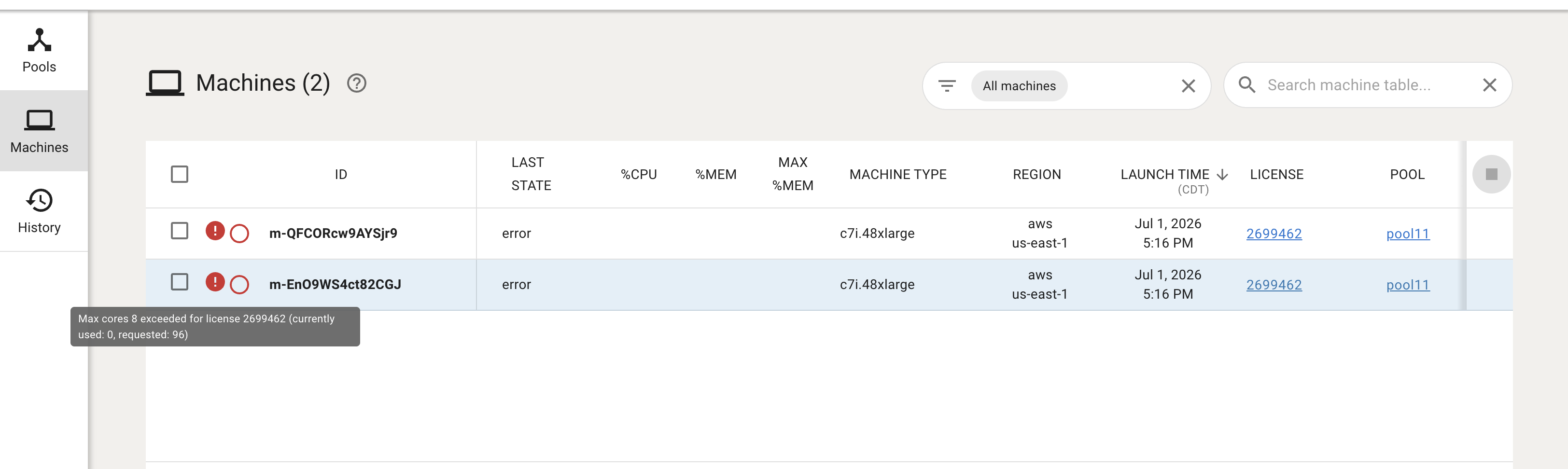
What to do:
Stop one or more running machines to free up cores, then try again
Contact your account manager to discuss upgrading your license or increasing your limit
Monitoring Your Usage#
Real-Time Monitoring#
To view your current concurrent core usage:
Log in to the Gurobi Cloud Portal
Navigate to Instant Cloud Manager
Go to Billing → Statements
Click on a statement to view running machines
In the Hourly Metrics section, select Max Concurrent Cores to see core usage over time
The hourly metrics chart shows your concurrent core usage throughout the selected billing period, helping you identify peak usage times and patterns.
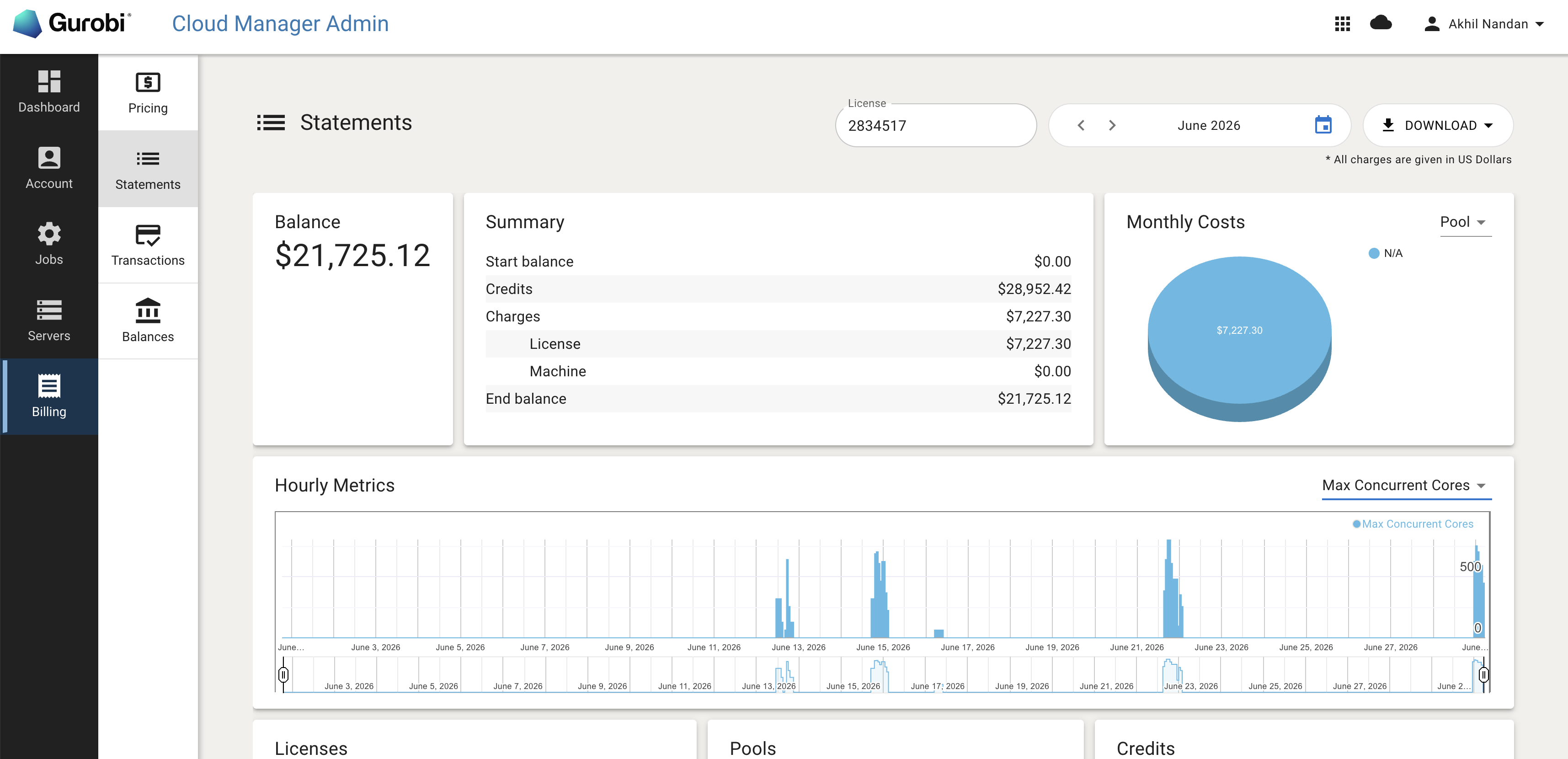
You can also view currently running machines by clicking on the statement, which shows each machine and its core count. Add up the cores from all running machines to see your current total.
API Monitoring#
You can also monitor usage programmatically via the Instant Cloud REST API:
Endpoint: GET /machines
Response: Returns all active machines
Note: The API response does not include a core count field for each machine. The response includes machineType (e.g., c5.4xlarge, Standard_F16s_v2), but you will need to map machine types to their core counts separately to calculate total concurrent core usage.
Analyzing Historical Usage#
Understanding Past Usage Patterns#
The Billing section provides detailed historical data to help you understand your usage patterns and make informed decisions:
What You Can See:
Hourly core usage — How many cores were running at any given hour
Peak usage times — When you used the most concurrent cores
Average usage — Your typical core consumption
Machine types used — Which machine sizes you deployed
How to Use This Information:
Identify Peak Demand Periods:
Look for hours when you hit or came close to your limit
Note the days and times when this happens
Example: If you see peaks every Monday morning, plan accordingly
Calculate Your 95th Percentile Usage:
This represents your typical high-water mark
Choose a plan that accommodates this level to avoid disruptions
Example: If 95% of the time you use under 120 cores, a 160-core plan provides good headroom
Understand Seasonal Variations:
Identify if your usage spikes during certain months
Plan for these peaks by optimizing your workload scheduling or consider adjusting your license if increased capacity is consistently needed
Analyze Machine Type Efficiency:
Compare costs and performance of different machine sizes
Example: Running one 64-core machine may be more efficient than four 16-core machines for certain workloads
Frequently Asked Questions#
Q: How do I know how many cores a machine type has?
A: Machine core counts are shown when you create or view pools. Common machine types include 8-core, 16-core, 32-core, and 64-core configurations. The exact types available depend on your cloud provider (AWS or Azure) and region.
Q: What happens to running jobs if I hit my limit?
A: Running jobs are never interrupted. The limit only prevents new machines from starting. Your existing jobs will continue to completion.
Q: Do distributed workers count toward my limit?
A: No. Distributed worker nodes used in distributed MIP or concurrent optimization do not count toward your concurrent core limit. Only compute server nodes count.
Q: Can I temporarily exceed my limit for critical work?
A: The system enforces the concurrent core limit. If you need additional capacity, contact your account manager to discuss options for your license.
Q: How can I see my historical concurrent core usage?
A: The Billing section provides historical machine usage data, including the number of cores used over time. This helps you understand your usage patterns and plan capacity needs. You can view hourly metrics, peak usage times, and calculate your 95th percentile usage.
Q: What should I do if I frequently hit my limit?
A: Review your usage patterns in the Billing section. If you consistently need more capacity, contact your account manager to discuss adjusting your license to better match your workload. Provide historical usage data to help them recommend the right plan.
Q: How much headroom should I have in my plan?
A: A good rule of thumb is to choose a plan where your 95th percentile usage is about 75-80% of your limit. This gives you headroom for occasional spikes while avoiding paying for unnecessary capacity. For example, if you typically use up to 120 cores, a 160-core plan provides appropriate buffer.
Q: Can I mix different machine sizes?
A: Yes, by using different pools. Each pool defines a single machine type, so all machines within a pool are the same size. To use different machine sizes, create multiple pools with different machine types.